The Automation Pyramid structures automated production entities into layers of specified tasks and corresponding IT infrastructure. The general level set separates a production site traditionally into six levels, forming a pyramid of high complexity at the bottom and sharp focus at the top. Data at lower levels is often time critical and needs to be processed directly at the edge of an IIoT installation.
In recent approaches to industry 4.0 nodes at the edge allow to flatten the Automation Pyramid by combining level 1 and level 2 (sometimes also level 0) into cyber-physical systems or smart production entities:
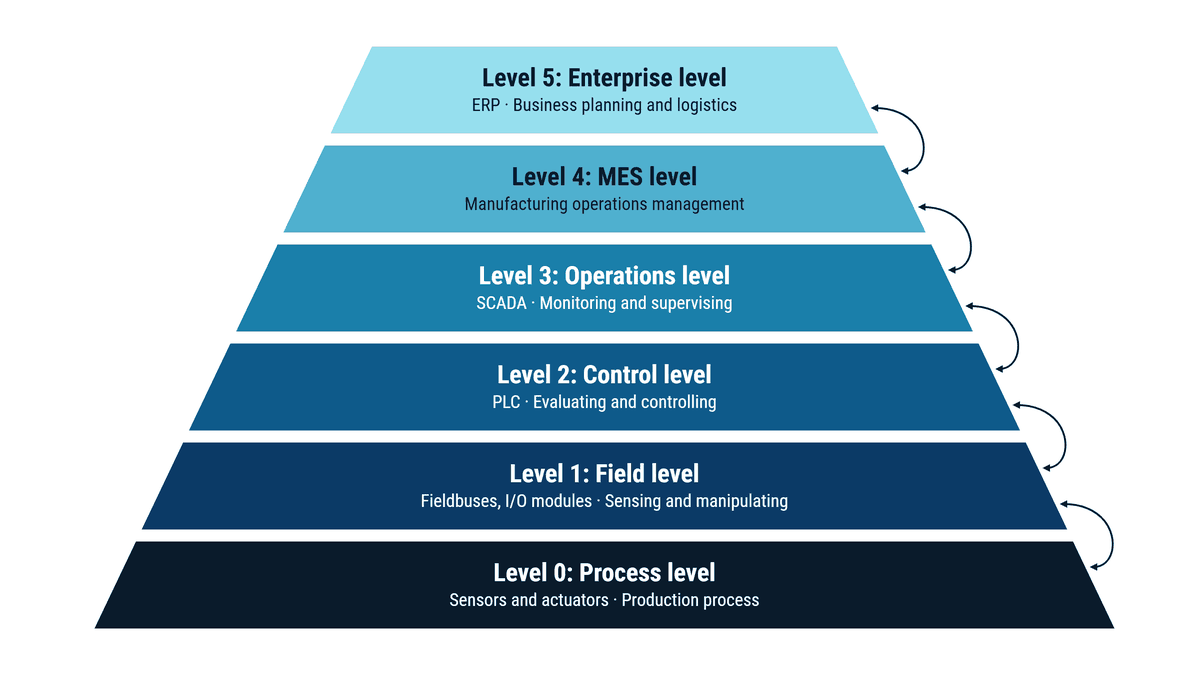
Simple sensors and actuators provide data and execute commands (e.g. sample temperature and programmatically turn on power for a fan).
Collects data and distributes commands, often using field bus and similar infrastructure (e.g. group multiple temperature data and instruct a device throttle workload).
Programmatically controls the production process by evaluating sensor data and issuing commands (e.g. analyze temperature change for rising temperature and assess counter actions to prevent damage). Standards such as OPC UA describe the data of this level so that higher levels can use it.
Offers a broader view through collections of datasets and at production devices. Also allowing recipe adaptions via process management systems (e.g. detect potential overheating and slow down production process for a device).
Manages production sites through production planning, performance monitoring and quality management (e.g. inform about reduced production capacity due to temperature and reduce raw material demand).
Provides general data for production planning like capacity limitations and connects order management systems and other relevant information from ERP systems (e.g. increase delivery times, prioritize fixed date orders, divert production to other plants, management may decide to install an air condition, …).
In the classic pyramid, systems are connected level by level, and every additional connection across levels is yet another interface of its own. A temperature reading from the field level only reaches the MES once the control and operations levels have passed it on. Every new system that needs machine data requires another integration project. The more applications need access to production data, the more this point-to-point structure slows things down.
A Unified Namespace (UNS) turns this principle around: all levels publish their data to a central, consistently structured data layer, and every system accesses it there directly, without going through the hierarchy. The levels of the pyramid don’t disappear, they still describe which system takes on which task. But the data flow no longer follows their structure. How this works in practice and how to build a UNS is explained in detail in our glossary article on the Unified Namespace.
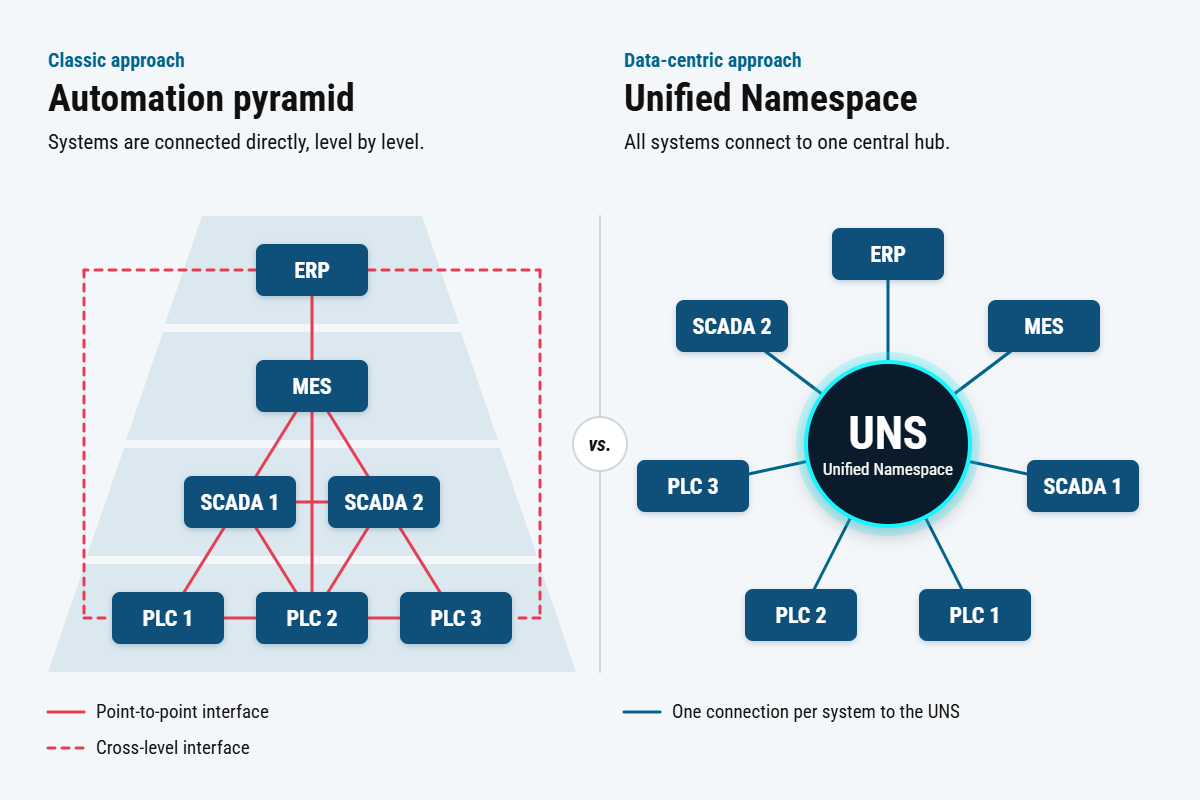
The levels of the automation pyramid remain in every factory: PLCs, SCADA, MES and ERP each have their own tasks and their own interfaces. Cybus Connectware connects these systems through a shared data layer instead of connecting each level individually to each application. Machines and controllers are connected once, and their data is then available in structured form and in real time for MES, cloud platforms and AI applications. At the same time, you define which system and which person may access which data.
This lets you add new use cases and additional plants without rebuilding the integration for every project.
You need to load content from reCAPTCHA to submit the form. Please note that doing so will share data with third-party providers.
More InformationYou are currently viewing a placeholder content from Turnstile. To access the actual content, click the button below. Please note that doing so will share data with third-party providers.
More InformationYou are currently viewing a placeholder content from Facebook. To access the actual content, click the button below. Please note that doing so will share data with third-party providers.
More InformationYou are currently viewing a placeholder content from Hubspot Embedded Content. To access the actual content, click the button below. Please note that doing so will share data with third-party providers.
More InformationYou are currently viewing a placeholder content from HubSpot. To access the actual content, click the button below. Please note that doing so will share data with third-party providers.
More InformationYou are currently viewing a placeholder content from Hubspot Meetings. To access the actual content, click the button below. Please note that doing so will share data with third-party providers.
More InformationYou are currently viewing a placeholder content from Instagram. To access the actual content, click the button below. Please note that doing so will share data with third-party providers.
More InformationYou are currently viewing a placeholder content from reCAPTCHA. To access the actual content, click the button below. Please note that doing so will share data with third-party providers.
More InformationYou are currently viewing a placeholder content from X. To access the actual content, click the button below. Please note that doing so will share data with third-party providers.
More Information